Kyle Stiemann from the Liferay Faces Team was kind enough to point out a flaw in the Java Server Faces libraries prior to versions JSF 2.3 and Mojarra 2.2.16 related to what I am presenting here. The solution requires two changes. The first is an addition to the web.xml file that you will see commented about in the file. The second change requires using newer versions JSF. Payara 4/Glassfish 4 manifests the problem. Payara 5/Glassfish 5, with the newer library, does not exhibit the problem. You can read about the problem at: JSFSPEC-1433 issue
Welcome to part 2 of 2 articles on confirming password entry into a JSF form. You should read part 1 at https://www.omnijava.com/2018/04/24/password-confirmation-on-a-jsf-page-part-1-a-simple-model/ to understand how I got to this point. In this example rather than a plain bean we will use the JPA with an Entity bean and a JPA controller as generated by my IDE of choice, NetBeans 8.2. In addition to using the JPA to save the login name and password, there is a new validator to ensure that the login name does not already exist in the database.
To run this code you will need MySQL or other SQL database. The scripts for creating the database and table are in src/test/resources. These must be run before you can execute the code.
You can download the project at https://gitlab.com/omniprof/JSFPasswordConfirmationEntityBean.git
To begin with let’s look at the NetBeans 8.2 generated Entity class:
[pastacode lang=”java” manual=”import%20java.io.Serializable%3B%0Aimport%20javax.persistence.Basic%3B%0Aimport%20javax.persistence.Column%3B%0Aimport%20javax.persistence.Entity%3B%0Aimport%20javax.persistence.Id%3B%0Aimport%20javax.persistence.Table%3B%0Aimport%20javax.validation.constraints.NotNull%3B%0Aimport%20javax.validation.constraints.Size%3B%0A%0A%40Entity%0A%40Table(name%20%3D%20%22user_table%22%2C%20catalog%20%3D%20%22JSF_PASSWORD%22%2C%20schema%20%3D%20%22%22)%0Apublic%20class%20User%20implements%20Serializable%20%7B%0A%0A%20%20%20%20private%20static%20final%20long%20serialVersionUID%20%3D%201L%3B%0A%20%20%20%20%40Id%0A%20%20%20%20%40Basic(optional%20%3D%20false)%0A%20%20%20%20%40NotNull%0A%20%20%20%20%40Size(min%20%3D%201%2C%20max%20%3D%2045)%0A%20%20%20%20%40Column(name%20%3D%20%22LOGIN_NAME%22)%0A%20%20%20%20private%20String%20loginName%3B%0A%20%20%20%20%40Basic(optional%20%3D%20false)%0A%20%20%20%20%40NotNull%0A%20%20%20%20%40Size(min%20%3D%201%2C%20max%20%3D%2012)%0A%20%20%20%20%40Column(name%20%3D%20%22PASSWORD%22)%0A%20%20%20%20private%20String%20password%3B%0A%0A%20%20%20%20public%20User()%20%7B%0A%20%20%20%20%7D%0A%0A%20%20%20%20public%20User(String%20loginName)%20%7B%0A%20%20%20%20%20%20%20%20this.loginName%20%3D%20loginName%3B%0A%20%20%20%20%7D%0A%0A%20%20%20%20public%20User(String%20loginName%2C%20String%20password)%20%7B%0A%20%20%20%20%20%20%20%20this.loginName%20%3D%20loginName%3B%0A%20%20%20%20%20%20%20%20this.password%20%3D%20password%3B%0A%20%20%20%20%7D%0A%0A%20%20%20%20public%20String%20getLoginName()%20%7B%0A%20%20%20%20%20%20%20%20return%20loginName%3B%0A%20%20%20%20%7D%0A%0A%20%20%20%20public%20void%20setLoginName(String%20loginName)%20%7B%0A%20%20%20%20%20%20%20%20this.loginName%20%3D%20loginName%3B%0A%20%20%20%20%7D%0A%0A%20%20%20%20public%20String%20getPassword()%20%7B%0A%20%20%20%20%20%20%20%20return%20password%3B%0A%20%20%20%20%7D%0A%0A%20%20%20%20public%20void%20setPassword(String%20password)%20%7B%0A%20%20%20%20%20%20%20%20this.password%20%3D%20password%3B%0A%20%20%20%20%7D%0A%0A%20%20%20%20%40Override%0A%20%20%20%20public%20int%20hashCode()%20%7B%0A%20%20%20%20%20%20%20%20int%20hash%20%3D%200%3B%0A%20%20%20%20%20%20%20%20hash%20%2B%3D%20(loginName%20!%3D%20null%20%3F%20loginName.hashCode()%20%3A%200)%3B%0A%20%20%20%20%20%20%20%20return%20hash%3B%0A%20%20%20%20%7D%0A%0A%20%20%20%20%40Override%0A%20%20%20%20public%20boolean%20equals(Object%20object)%20%7B%0A%20%20%20%20%20%20%20%20%2F%2F%20TODO%3A%20Warning%20-%20this%20method%20won’t%20work%20in%20the%20case%20the%20id%20fields%20are%20not%20set%0A%20%20%20%20%20%20%20%20if%20(!(object%20instanceof%20User))%20%7B%0A%20%20%20%20%20%20%20%20%20%20%20%20return%20false%3B%0A%20%20%20%20%20%20%20%20%7D%0A%20%20%20%20%20%20%20%20User%20other%20%3D%20(User)%20object%3B%0A%20%20%20%20%20%20%20%20if%20((this.loginName%20%3D%3D%20null%20%26%26%20other.loginName%20!%3D%20null)%20%7C%7C%20(this.loginName%20!%3D%20null%20%26%26%20!this.loginName.equals(other.loginName)))%20%7B%0A%20%20%20%20%20%20%20%20%20%20%20%20return%20false%3B%0A%20%20%20%20%20%20%20%20%7D%0A%20%20%20%20%20%20%20%20return%20true%3B%0A%20%20%20%20%7D%0A%0A%20%20%20%20%40Override%0A%20%20%20%20public%20String%20toString()%20%7B%0A%20%20%20%20%20%20%20%20return%20%22com.jsfpasswordconfirm.entities.UserTable%5B%20loginName%3D%22%20%2B%20loginName%20%2B%20%22%20%5D%22%3B%0A%20%20%20%20%7D%0A%20%20%20%20%0A%7D%0A” message=”User.java” highlight=”” provider=”manual”/]
This entity class is not under the management of CDI. Therefore the backing bean will be responsible for creating the entity bean in the getUser() method. The JPA controller class will be managed by CDI and is injected into the backing bean.
You should take note of the fact that JSR-303 Bean Validation annotations are used. Specifically, each field has an @Size annotation that comes from JSR-303. The same validation is also present on the JSF form using f:validateLength. Here is where I stumbled across an unusual behavior.
When I leave the fields blank I trigger the JSF required validation and the appropriate message from the bundle is displayed. When I exceed the length of the fields, 45 for login name and 12 for password something unusual occurs. I get two messages, one from the JSF validator and one from JSR-303. This does not make sense to me because I expect the JSR-303 validation to occur only if the JSF validation is successful and we apply the UI elements to the model. Searching for why this is occurring has not turned up a reason. If you know why this is happening please let me know.
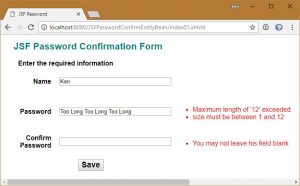
Double validation message
There are two ways to handle this problem. The first is to remove all validation from the JSF form that matches a JSR-303 validation and only have JSR-303 validation in the bean. While this works it moves the validation away from the user interface. I prefer to validate closer to the user. The opposite approach, remove the JSR-303 validation from the bean, should never be done. Entity beans are filled not just from the user interface but from the database and possibly other classes in the application. There must be bean validation.
The solution I discovered is simple. You can prevent bean validation from occurring by adding:
<f:validateBean disabled="true" />
You only need to add this to the login name and password. The password confirm field is not in the entity so it is not subject to JSR-303 validation. Here is the JSF page.
[pastacode lang=”markup” manual=”%3C%3Fxml%20version%3D’1.0’%20encoding%3D’UTF-8’%20%3F%3E%0A%3C!DOCTYPE%20html%20PUBLIC%20%22-%2F%2FW3C%2F%2FDTD%20XHTML%201.0%20Transitional%2F%2FEN%22%20%22http%3A%2F%2Fwww.w3.org%2FTR%2Fxhtml1%2FDTD%2Fxhtml1-transitional.dtd%22%3E%0A%3Chtml%20xmlns%3D%22http%3A%2F%2Fwww.w3.org%2F1999%2Fxhtml%22%0A%20%20%20%20%20%20xmlns%3Ah%3D%22http%3A%2F%2Fxmlns.jcp.org%2Fjsf%2Fhtml%22%0A%20%20%20%20%20%20xmlns%3Af%3D%22http%3A%2F%2Fxmlns.jcp.org%2Fjsf%2Fcore%22%3E%0A%0A%20%20%20%20%3Ch%3Ahead%3E%0A%20%20%20%20%20%20%20%20%3Ctitle%3E%23%7Bmsgs.pageTitle%7D%3C%2Ftitle%3E%0A%20%20%20%20%20%20%20%20%3Ch%3AoutputStylesheet%20library%3D%22css%22%20name%3D%22styles.css%22%20%2F%3E%0A%20%20%20%20%3C%2Fh%3Ahead%3E%0A%20%20%20%20%3Ch%3Abody%3E%0A%20%20%20%20%20%20%20%20%3Ch1%3E%23%7Bmsgs.pageHeader1%7D%3C%2Fh1%3E%0A%20%20%20%20%20%20%20%20%3Ch%3Aform%3E%0A%20%20%20%20%20%20%20%20%20%20%20%20%3Ch%3ApanelGrid%20columns%3D%223%22%20cellpadding%3D%221%22%20border%3D%220%22%20cellspacing%3D%2210%22%0A%20%20%20%20%20%20%20%20%20%20%20%20%20%20%20%20%20%20%20%20%20%20%20%20%20title%3D%22%23%7Bmsgs.signup%7D%22%20columnClasses%3D%22firstColumn%2CsecondColumn%2CthirdColumn%22%0A%20%20%20%20%20%20%20%20%20%20%20%20%20%20%20%20%20%20%20%20%20%20%20%20%20rowClasses%3D%22rowHeight%2C%20rowHeight%22%3E%0A%20%20%20%20%20%20%20%20%20%20%20%20%20%20%20%20%3Cf%3Afacet%20name%3D%22header%22%3E%0A%20%20%20%20%20%20%20%20%20%20%20%20%20%20%20%20%20%20%20%20%3Ch%3AoutputText%20value%3D%22%23%7Bmsgs.signup%7D%22%20%2F%3E%0A%20%20%20%20%20%20%20%20%20%20%20%20%20%20%20%20%3C%2Ff%3Afacet%3E%0A%0A%20%20%20%20%20%20%20%20%20%20%20%20%20%20%20%20%3Ch%3AoutputLabel%20for%3D%22login_name%22%20value%3D%22%23%7Bmsgs.login_name%7D%22%2F%3E%0A%20%20%20%20%20%20%20%20%20%20%20%20%20%20%20%20%3Ch%3AinputText%20id%3D%22login_name%22%20%0A%20%20%20%20%20%20%20%20%20%20%20%20%20%20%20%20%20%20%20%20%20%20%20%20%20%20%20%20%20value%3D%22%23%7BpasswordBacking.user.loginName%7D%22%0A%20%20%20%20%20%20%20%20%20%20%20%20%20%20%20%20%20%20%20%20%20%20%20%20%20%20%20%20%20required%3D%22true%22%0A%20%20%20%20%20%20%20%20%20%20%20%20%20%20%20%20%20%20%20%20%20%20%20%20%20%20%20%20%20requiredMessage%3D%22%23%7Bmsgs.required%7D%22%20%0A%20%20%20%20%20%20%20%20%20%20%20%20%20%20%20%20%20%20%20%20%20%20%20%20%20%20%20%20%20validator%3D%22%23%7BpasswordBacking.validateUniquePassword%7D%22%3E%0A%20%20%20%20%20%20%20%20%20%20%20%20%20%20%20%20%20%20%20%20%3Cf%3AvalidateLength%20maximum%3D%2245%22%20%2F%3E%0A%20%20%20%20%20%20%20%20%20%20%20%20%20%20%20%20%20%20%20%20%3Cf%3AvalidateBean%20disabled%3D%22true%22%20%2F%3E%0A%20%20%20%20%20%20%20%20%20%20%20%20%20%20%20%20%3C%2Fh%3AinputText%3E%0A%20%20%20%20%20%20%20%20%20%20%20%20%20%20%20%20%3Ch%3Amessages%20for%3D%22login_name%22%20styleClass%3D%22message%22%20%2F%3E%0A%0A%20%20%20%20%20%20%20%20%20%20%20%20%20%20%20%20%3Ch%3AoutputLabel%20for%3D%22password%22%20value%3D%22%23%7Bmsgs.password%7D%22%2F%3E%0A%20%20%20%20%20%20%20%20%20%20%20%20%20%20%20%20%3Ch%3AinputText%20id%3D%22password%22%20label%3D%22%23%7Bmsgs.age%7D%22%0A%20%20%20%20%20%20%20%20%20%20%20%20%20%20%20%20%20%20%20%20%20%20%20%20%20%20%20%20%20value%3D%22%23%7BpasswordBacking.user.password%7D%22%0A%20%20%20%20%20%20%20%20%20%20%20%20%20%20%20%20%20%20%20%20%20%20%20%20%20%20%20%20%20required%3D%22true%22%0A%20%20%20%20%20%20%20%20%20%20%20%20%20%20%20%20%20%20%20%20%20%20%20%20%20%20%20%20%20requiredMessage%3D%22%23%7Bmsgs.required%7D%22%3E%0A%20%20%20%20%20%20%20%20%20%20%20%20%20%20%20%20%20%20%20%20%3Cf%3AvalidateLength%20maximum%3D%2212%22%20%2F%3E%0A%20%20%20%20%20%20%20%20%20%20%20%20%20%20%20%20%20%20%20%20%3Cf%3AvalidateBean%20disabled%3D%22true%22%20%2F%3E%0A%20%20%20%20%20%20%20%20%20%20%20%20%20%20%20%20%3C%2Fh%3AinputText%3E%0A%20%20%20%20%20%20%20%20%20%20%20%20%20%20%20%20%3Ch%3Amessages%20for%3D%22password%22%20styleClass%3D%22message%22%20%2F%3E%0A%0A%20%20%20%20%20%20%20%20%20%20%20%20%20%20%20%20%3Ch%3AoutputLabel%20for%3D%22password_confirm%22%20value%3D%22%23%7Bmsgs.confirm%7D%22%2F%3E%0A%20%20%20%20%20%20%20%20%20%20%20%20%20%20%20%20%3Ch%3AinputText%20id%3D%22password_confirm%22%0A%20%20%20%20%20%20%20%20%20%20%20%20%20%20%20%20%20%20%20%20%20%20%20%20%20%20%20%20%20value%3D%22%23%7BpasswordBacking.passwordConfirm%7D%22%0A%20%20%20%20%20%20%20%20%20%20%20%20%20%20%20%20%20%20%20%20%20%20%20%20%20%20%20%20%20required%3D%22true%22%0A%20%20%20%20%20%20%20%20%20%20%20%20%20%20%20%20%20%20%20%20%20%20%20%20%20%20%20%20%20requiredMessage%3D%22%23%7Bmsgs.required%7D%22%0A%20%20%20%20%20%20%20%20%20%20%20%20%20%20%20%20%20%20%20%20%20%20%20%20%20%20%20%20%20validator%3D%22%23%7BpasswordBacking.validatePasswordCorrect%7D%22%20%3E%0A%20%20%20%20%20%20%20%20%20%20%20%20%20%20%20%20%20%20%20%20%3Cf%3AvalidateLength%20maximum%3D%2212%22%20%2F%3E%0A%20%20%20%20%20%20%20%20%20%20%20%20%20%20%20%20%3C%2Fh%3AinputText%3E%0A%20%20%20%20%20%20%20%20%20%20%20%20%20%20%20%20%3Ch%3Amessages%20for%3D%22password_confirm%22%20styleClass%3D%22message%22%20%2F%3E%0A%0A%20%20%20%20%20%20%20%20%20%20%20%20%3C%2Fh%3ApanelGrid%3E%0A%20%20%20%20%20%20%20%20%20%20%20%20%3Ch%3AcommandButton%20id%3D%22saveButton%22%20value%3D%22%23%7Bmsgs.save%7D%22%0A%20%20%20%20%20%20%20%20%20%20%20%20%20%20%20%20%20%20%20%20%20%20%20%20%20%20%20%20%20action%3D%22%23%7BpasswordBacking.createUser()%7D%22%0A%20%20%20%20%20%20%20%20%20%20%20%20%20%20%20%20%20%20%20%20%20%20%20%20%20%20%20%20%20styleClass%3D%22myButton%22%2F%3E%0A%20%20%20%20%20%20%20%20%3C%2Fh%3Aform%3E%0A%20%20%20%20%3C%2Fh%3Abody%3E%0A%3C%2Fhtml%3E%0A” message=”index01.xhtml” highlight=”” provider=”manual”/]
I have added one additional validator. The login name is the primary key. Therefore, it is necessary to test if the login name is already in the database.
validator="#{passwordBacking.validateUniquePassword}"
In the backing bean I have added the method validateUniquePassword. Here is the updated backing bean.
[pastacode lang=”java” manual=”import%20com.jsfpasswordconfirm.controller.UserTableJpaController%3B%0Aimport%20com.jsfpasswordconfirm.entities.User%3B%0Aimport%20java.io.Serializable%3B%0Aimport%20javax.enterprise.context.RequestScoped%3B%0Aimport%20javax.faces.application.FacesMessage%3B%0Aimport%20javax.faces.component.UIComponent%3B%0Aimport%20javax.faces.component.UIInput%3B%0Aimport%20javax.faces.context.FacesContext%3B%0Aimport%20javax.faces.validator.ValidatorException%3B%0Aimport%20javax.inject.Inject%3B%0Aimport%20javax.inject.Named%3B%0Aimport%20org.slf4j.Logger%3B%0Aimport%20org.slf4j.LoggerFactory%3B%0A%0A%40Named(%22passwordBacking%22)%0A%40RequestScoped%0Apublic%20class%20PasswordBackingBean%20implements%20Serializable%20%7B%0A%0A%20%20%20%20private%20final%20static%20Logger%20LOG%20%3D%20LoggerFactory.getLogger(PasswordBackingBean.class)%3B%0A%0A%20%20%20%20%40Inject%0A%20%20%20%20private%20UserTableJpaController%20controller%3B%0A%0A%20%20%20%20%2F%2F%20The%20entity%20object%0A%20%20%20%20private%20User%20user%3B%0A%20%20%20%20%2F%2F%20The%20value%20for%20the%20confirmPassword%20field%20that%20does%20not%20exist%20in%20the%20entity%0A%20%20%20%20private%20String%20passwordConfirm%3B%0A%0A%20%20%20%20public%20User%20getUser()%20%7B%0A%20%20%20%20%20%20%20%20LOG.trace(%22getUser%22)%3B%0A%20%20%20%20%20%20%20%20if%20(user%20%3D%3D%20null)%20%7B%0A%20%20%20%20%20%20%20%20%20%20%20%20LOG.debug(%22Creating%20new%20User%20entity%20object%22)%3B%0A%20%20%20%20%20%20%20%20%20%20%20%20user%20%3D%20new%20User()%3B%0A%20%20%20%20%20%20%20%20%7D%0A%20%20%20%20%20%20%20%20return%20user%3B%0A%20%20%20%20%7D%0A%0A%20%20%20%20%2F**%0A%20%20%20%20%20*%20Save%20the%20current%20person%20to%20the%20db%0A%20%20%20%20%20*%0A%20%20%20%20%20*%20%40return%0A%20%20%20%20%20*%20%40throws%20Exception%0A%20%20%20%20%20*%2F%0A%20%20%20%20public%20String%20createUser()%20throws%20Exception%20%7B%0A%20%20%20%20%20%20%20%20LOG.trace(%22Creating%20new%20User%20entity%20object%22)%3B%0A%20%20%20%20%20%20%20%20controller.create(user)%3B%0A%20%20%20%20%20%20%20%20return%20%22doSomething%22%3B%0A%20%20%20%20%7D%0A%0A%20%20%20%20public%20String%20getPasswordConfirm()%20%7B%0A%20%20%20%20%20%20%20%20LOG.trace(%22getPasswordConfirm%22)%3B%0A%20%20%20%20%20%20%20%20return%20passwordConfirm%3B%0A%20%20%20%20%7D%0A%0A%20%20%20%20public%20void%20setPasswordConfirm(String%20passwordConfirm)%20%7B%0A%20%20%20%20%20%20%20%20LOG.trace(%22setPasswordConfirm%22)%3B%0A%20%20%20%20%20%20%20%20this.passwordConfirm%20%3D%20passwordConfirm%3B%0A%20%20%20%20%7D%0A%0A%20%20%20%20public%20void%20validatePasswordCorrect(FacesContext%20context%2C%20UIComponent%20component%2C%0A%20%20%20%20%20%20%20%20%20%20%20%20Object%20value)%20%7B%0A%0A%20%20%20%20%20%20%20%20LOG.trace(%22validatePasswordCorrect%22)%3B%0A%0A%20%20%20%20%20%20%20%20%2F%2F%20Retrieve%20the%20value%20passed%20to%20this%20method%0A%20%20%20%20%20%20%20%20String%20confirmPassword%20%3D%20(String)%20value%3B%0A%0A%20%20%20%20%20%20%20%20%2F%2F%20Retrieve%20the%20temporary%20value%20from%20the%20password%20field%0A%20%20%20%20%20%20%20%20UIInput%20passwordInput%20%3D%20(UIInput)%20component.findComponent(%22password%22)%3B%0A%20%20%20%20%20%20%20%20String%20password%20%3D%20(String)%20passwordInput.getLocalValue()%3B%0A%0A%20%20%20%20%20%20%20%20LOG.debug(%22validatePasswordCorrect%3A%20%22%20%2B%20password%20%2B%20%22%20and%20%22%20%2B%20confirmPassword)%3B%0A%20%20%20%20%20%20%20%20if%20(password%20%3D%3D%20null%20%7C%7C%20confirmPassword%20%3D%3D%20null%20%7C%7C%20!password.equals(confirmPassword))%20%7B%0A%20%20%20%20%20%20%20%20%20%20%20%20String%20message%20%3D%20context.getApplication().evaluateExpressionGet(context%2C%20%22%23%7Bmsgs%5B’nomatch’%5D%7D%22%2C%20String.class)%3B%0A%20%20%20%20%20%20%20%20%20%20%20%20FacesMessage%20msg%20%3D%20new%20FacesMessage(FacesMessage.SEVERITY_ERROR%2C%20message%2C%20message)%3B%0A%20%20%20%20%20%20%20%20%20%20%20%20throw%20new%20ValidatorException(msg)%3B%0A%20%20%20%20%20%20%20%20%7D%0A%20%20%20%20%7D%0A%0A%20%20%20%20public%20void%20validateUniquePassword(FacesContext%20context%2C%20UIComponent%20component%2C%0A%20%20%20%20%20%20%20%20%20%20%20%20Object%20value)%20%7B%0A%0A%20%20%20%20%20%20%20%20LOG.trace(%22validateUniquePassword%22)%3B%0A%0A%20%20%20%20%20%20%20%20%2F%2F%20Retrieve%20the%20value%20passed%20to%20this%20method%0A%20%20%20%20%20%20%20%20String%20loginName%20%3D%20(String)%20value%3B%0A%0A%20%20%20%20%20%20%20%20LOG.debug(%22validateUniquePassword%3A%20%22%20%2B%20loginName)%3B%0A%20%20%20%20%20%20%20%20if%20(controller.findUser(loginName)%20!%3D%20null)%20%7B%0A%20%20%20%20%20%20%20%20%20%20%20%20String%20message%20%3D%20context.getApplication().evaluateExpressionGet(context%2C%20%22%23%7Bmsgs%5B’duplicate’%5D%7D%22%2C%20String.class)%3B%0A%20%20%20%20%20%20%20%20%20%20%20%20FacesMessage%20msg%20%3D%20new%20FacesMessage(FacesMessage.SEVERITY_ERROR%2C%20message%2C%20message)%3B%0A%20%20%20%20%20%20%20%20%20%20%20%20throw%20new%20ValidatorException(msg)%3B%0A%20%20%20%20%20%20%20%20%7D%0A%20%20%20%20%7D%0A%0A%7D%0A” message=”PasswordBackingBean.java” highlight=”” provider=”manual”/]
As mentioned earlier in this article the getUser() method creates the User entity, it is not injected. The validateUniquePassword method calls upon the JPA controller’s findUser method that either returns an entity or a null reference.
Everything is in place now. The form now validates that there is input in the fields, validates the length of the fields, validates that entry of the password in the two password fields is the same and validates that the login name will be unique in the database.