JCP Executive Committee Meeting – Singapore April 2023

I first ran for a seat on the JCP EC because I was concerned about how Java was losing relevance in education. The JCP Java in Education initiative was started to improve Java’s place in schools. When I was first elected by my peers to the JCP EC, one of the perks of being a member of this committee was the two face-to-face meetings held each year. One was typically in North America and the other in Asia. The only problem with this was that I was first elected in November 2019. I had my plane and hotel reservation for Singapore all in place for the April 2020 meeting. Well, you all know what happened. Luckily everything was cancellable.

My first term was for one year as I was replacing an associate member who left the EC because of a change in employment. I ran again in the November 2020 elections and was reelected to a two-year term as an associate member. An associate member represents the independent members who are members of the Java Community Process. Well, you all know that what happened in 2019 through to 2020 continued into 2021 and 2022.

In November 2022 I was elected to a third term on the Executive Committee. I am writing this blog at 9753 meters in the air on the first leg of my return flight from Singapore on April 14. The meeting happened in 2023! The remainder of this blog is a summary of what occurred, all very good, during the four days I was in Singapore. Please do not misunderstand me, I did not run for election to the JCP EC for the trips. They were just icing on the cake.

Normally you get on a plane, sit for a few hours, and get somewhere. This trip was a little different. To get to the meeting I needed to take 3 flights. I left Montreal on April 8th and some 32 hours later, including layovers, I arrived at 7 AM on April 10th. Crossing the International Date Line added a day on my calendar. The return flight I am on now left at 9 AM on April 14 and will arrive in Montreal at 11:45 PM the same day. What the International Date Line added was subtracted but still the same 32 hours of travel time. The times I mention are the local time I left and then the local time I arrived.

It was a difficult transit for me. My first flight was for 4 ½ hours to Denver, Colorado. There was an almost 3-hour layover in Denver, and it will be almost 4 hours on the way back. All started well in Denver. We boarded the plane on time but just as we were waiting to leave the gate for the runway the captain announced that the Denver airport was closed to all flights. The FAA detected microbursts, a weather condition that could be a danger to the plane. So, we sat for about 45 minutes before the plane left the gate to join the queue of planes waiting to leave. In another half hour we were in the air.

When we disembarked from the plane in San Francisco it was already 10 minutes past the start of boarding for the last leg. Fortunately, after a jog across the airport to get to the gate, I arrived to find that boarding had not begun. This gave me a few minutes to refresh myself before I boarded this flight. Now the real adventure or misery began. The SFO to SIN flight was 17 hours. I had already been in the air for 7 hours. If you are doing the math, the flight time came to about 24 hours. Arriving at the airport 3 hours ahead of the flight and the layover in Denver, the 45 minutes I was in SF, added the extra hours is how I measure the travel time.

A few words about a 17-hour flight. It is about as miserable as a flight could be. I am not talking about the flight staff, they were wonderful. The plane, a Boeing 787 Dreamliner, had a little more legroom in steerage, I mean economy, than the 757 and A-220 planes I took to get to SF. A flight attendant told me that she prefers the 787 because it is pressurized to 6,000 rather than 10,000 feet. Sitting in a plane for that long is not an experience you should long for. I did try to sleep and suspect I did for about an hour and a half. My sleep pattern is very much like toy dolls that close their eyes when they are laid down. I am the same way, I lie down, close my eyes, and almost always fall right asleep. I could not achieve restful sleep sitting up.

Despite the discomfort I arrived In Singapore on April 10th running on the excitement of the trip, and happy to get off the plane. My accommodations were at the Hilton Garden Inn in the Little India section of the city. I arrived at the hotel 3 hours before check in time but fortunately there was a room available right away. The room also came with breakfast every morning. It was buffet style with a good breakfast selection. I rate it highly because they had lots of bacon cooked the way I like it.

On the first day I decided to explore the neighborhood around the hotel before napping. As I already said, the hotel was in Little India. I did a little exploring but the experience of high humidity with a temperature of 34 Celsius was quite uncomfortable. I decided after walking a few blocks to return to the hotel. There was a restaurant on the grounds of the hotel that was air conditioned, so I had lunch there. I ordered a dish with 2 vegetable Samosas and a small bowl of chickpeas in a delightful and spicey sauce. Indian cuisine has always been my favorite and it was delicious. After the meal I returned to the room, set an alarm, and took a three-hour nap.

I awoke to a case of heartburn that I quickly put out with some antacids. To me this was more proof that my meal was excellent despite what my stomach may have decided. That afternoon another member of the JCP, Rafael del Nero of SouJava, arrived at the same hotel. He arrived from Dublin. We did a bit of exploring after he arrived. The taxi driver he had from the airport recommended an area, I’d call it an outdoor food mall, within walking distance of the hotel. I had a sweet and sour chicken dish with rice and Rafael had a Chillie Crab. He needed instructions on how to eat it. We both enjoyed our meals and returned to the hotel. I stayed up another hour and went to bed.

I was going to bed at 10 PM Singapore time. My body was confused as it thought it was 10 AM. Despite this I slept till about 6 AM. I met Rafael for breakfast and then we headed off to the day’s planned activity. We were visiting the offices of Oracle where three university professors and a student leader of the local Java User Group came to talk about Java in Education. It began with presentations from Oracle. First Georges Saab, Senior Vice President of Development Java Platform Group spoke, and he was followed by a presentation on a typical day of an Oracle developer. We ended with a discussion with the professors about their use of Java.

When our meeting ended, a third member of the JCP who was staying at our hotel, Mala Gupta of JetBrains, joined Rafael and myself for some sightseeing. We quickly agreed that a visit to the Marina Bay Sands Hotel was what we wanted to do. This is a famous hotel with three 56 story towers topped with a deck, shaped a little like a boat that extended across all three towers. The front of the boat on the first tower was a general observation deck that for $26 you could visit. The remainder of the deck was just available to guests of the hotel that included a pool and restaurants. The hotel is close to the harbor, and this gave it an excellent view of the city. We must have spent close to two hours up there before we returned to the hotel.

After freshening up back at the hotel we went looking for food. We came across an Indian and Nepalese restaurant. A favorite restaurant some years back in Montreal had Nepalese cuisine so I was excited to be reacquainted with it. While Rafael enjoyed his dish, Mala, who hails from New Delhi, and I were disappointed. We could not finish our meals. I felt so bad about the food there, I paid the bill. The plan was to return to our rooms and then go out again for supper. Mala, who had just arrived that morning, decided not to join us.

When I got to the room a wave of exhaustion, likely because of the time difference, overcame me and I messaged Rafael that I was not up to another meal. He responded by agreeing that he was not hungry, but he wanted to visit the Chinese section of the city. I didn’t travel to the other side of the planet to hang out in my hotel room so I replied that I would join him. At 8 PM we called a Grab, the local equivalent to Uber, and went to the Chinese district.

What we discovered was an area that, like Little India, had numerous shops and even more numerous restaurants and food kiosks. The difference, of course, was the motifs. After we wandered around for a while we returned to the hotel. While we took a Grab to get there, we decided to walk back to the hotel. It gave us an opportunity to see a bit more of the city.

The next day, Wednesday, was the official JCP EC meeting. The meeting was held at the offices of Alibaba. We heard presentations on the direction of Java. I am very excited about what I heard regarding changes that, while having little or no effect on existing coding practices, will greatly simplify the learning of the language for beginners. There has been a concern in the Java community about Python replacing Java in many schools. I believe that the changes we heard about can make Java as friendly as Python. We just must get the word out that the current and upcoming versions of Java should make Java a serious contender, again, for students at primary schools, secondary schools, and universities.

After the meetings the three of us returned to the hotel to freshen up and then joined everyone for a traditional meal at a restaurant called True Blue. Rather than each of us ordering our own meal, all the dishes on the menu were brought to the table. It reminded me of a tapas style meal where you get several dishes that you can taste. The food was interesting with some hits and some misses for my Canadian taste buds. After the meal some of went to a bar. A better description is a bar mall. In a modern mall-like setting there were numerous bars. No ambiance to soak up but we engaged in some lively conversation and got a chance to know each other better. I also had my second beer of 2023, my first was the day before.

The final day, Thursday, had two events scheduled. The first was a visit to a university to meet students. It began with a panel discussion on Java and working as a developer. It was followed by a presentation I gave on some of the new features in Java and how you can use Java to do machine learning. It was the Artificial Intelligence/Machine Learning, AI/ML part of my presentation that most interested the students and even their professors. As one on the slide read “You can program AI/ML in any language as long as it’s Python” I demonstrated to these students that Java can be as easy or possibly easier than Python for someone wishing to explore AI/ML.

The language Python is popular in this space because most AI/ML libraries are written in C/C++ and Python easily interfaces with these libraries. It is rare that an AI/ML framework is written in Python. This makes Python the go to language for this work. I demonstrated a Java framework called JSR-381 VisRec. It provides a standard interface to any AI/ML code written in Java rather than C. At its most basic you need just one line of code to train a system and one line of code to use a trained system.

An enhancement to Java will simplify Java’s ability to interact with C/C++ libraries almost as easily as Python does is coming shortly. Using a picture of my dog, a Shetland Sheepdog named Willow, along with two hundred other photos of Shelties and 200 images of dogs that were Not Shelties that were used to train the model, I demonstrated a weakness in ML due to the quality of training images. The students had already told us that most only used Python in their courses. When I presented upcoming simplifications to Java along with the simplicity of ML, I believe we changed their opinion of Java. We just need to get the word out that it is not your mother’s Java anymore.

From there we returned to the hotel to prepare for a mini conference put on by the Singapore Java Users’ Group in a conference amphitheater in another part of the city. We were flattered that they called it the Java Heroes Conference. We began with a panel discussion and then there were three technical presentations by members of the JCP. After the first presentation we paused for a supper of pizza. It was during supper that several JUG members asked to take selfies with us. I think of that as the modern autograph.

I was beginning to feel the effects of the trip. After the pizza and during the first after pizza presentation  I found myself falling asleep. I decided to return to the hotel early as I still had to pack and get ready for today’s return home. As I write this, I see that we just passed Tokyo, just another 8 ½ hours to San Francisco.

This has been, except for the travelling, an amazing experience. I’ve travelled to the other side of the world and met members of the JCP I have only seen on Zoom. Speaking to students, something I have not done in almost two years since I retired, was a lot of fun. Those who know me will tell you that I tend to perform rather than lecture and I enjoy doing that. I hope to have more opportunities as a guest speaker at student events in the future.

I’ll end with a plug for my upcoming book. It is called Transitioning to Java, a beginner’s book for experts, that will be officially published on May 5th. This is a book for programmers with little or no experience with Java who find themselves needing to understand the language in the time it takes to read a book. While waiting for the flight this morning I chatted with a young man who worked in IT. He obviously knew what Java is, but his training was in C/C++. When we talked about how Java remains as relevant as ever and that some cool stuff is coming down the pipeline, he asked me for the book’s title and my name and assured me he will buy a copy. That makes one copy that may be sold.

Ken Fogel

April 14, 2023
Java for Beginners – My Unsuccessful Book Proposal

Java for Beginners – My Unsuccessful Book Proposal

One of the tasks I set for myself when I retired from the classroom in June 2021 from Dawson College was to write a book that taught Java to absolute beginners. While there are many great books out there I felt that many perpetuated an approach that has not changed since Java 1.0. I had already spoken with two publishers who both were interested in what I might do. I did once write a book in the 1980s. It was an instructional manual on using the spreadsheet program Lotus 1-2-3 for a school that trained office workers.

Rather than enter into a formal arrangement with the publishers I proposed writing one chapter that they could review. This way they could determine if what I wanted to write was publishable and if not then not too much time was going to be wasted by them. What follows is what I presented to them. One of the publishers very politely said no, they already had a very successful beginners book and did not feel another book of this type was what they were looking for. I never heard back from the other publisher.

I will continue to write the book. Chapter 3 will be titled Boxes and it will be about variables and memory. Take a look, let me know what you think. Just be gentle.


Possible Titles

Java as Your First Programming Language* Featuring absolutely no code to download, you type it all in yourself!

You know the difference between a Mouse and Keyboard, now it is time to learn Java.

Java Programming for the Passionate The First Path to Becoming a Java Programmer

Not very good, are they. Here is where I thought the publisher could help with a better title.

Chapter 1 Notes

The sample chapter I decided to submit is Chapter 2. I did this because I foresaw Chapter 1 as a place to discuss the concepts and terminology used in subsequent chapters. Here is what I sent to the publishers about chapter 1.

As I wrote chapter two, I recognized concepts I needed to explain in chapter one. Therefore, chapter one may be the last chapter I write.

  • Discuss ordinal and cardinal.
  • Folder organization.
  • Java installation.
  • Text editor.
  • Console / terminal
  • Conventions versus Rule: Convention means a practice used by most programmers but for which there is no rule, and you cannot get it wrong.
  • Compile, execute: javac, java
  • Classes versus objects
  • Parameter versus argument.
  • Runtime and compile time
  • IDE
  • JVM
  • Bytecode
  • Syntax
  • Algorithm
  • Set up working environment

Chapter 2 – The worst program you must write, HelloWorld.java

Here we go, what follows is what I submitted. Hopefully the transfer from Word to WordPress worked.

In chapter 1 we looked at some basic programming concepts and learned about the tooling we needed to write programs in Java. Now it is time to write and run your first program. There is a tradition surrounding the first program you write. This is the origin of Hello World.

The Hello World program performs one simple task, it displays in a console or terminal window the phrase Hello World. Its initial purpose was to allow a developer to get a quick sense of how different programming languages perform this simple task. It has also launched many a programmer in the wrong direction by inadvertently giving them the belief that that this is the model to follow from here on in. That will not happen in this book. Here you will learn how to write a Hello World professionally.

Let us begin by entering the following code and then executing it. I want you to work with a simple text editor and run the code from the command line. Please do not use an IDE. Open your text editor and enter the following, letter for letter. You must be precise as the only reason this little program will not run is if you made a typing error.

Here is the code:

public class HelloWorld {
    
    public void perform() {
        System.out.println("Hello World");
    }
    
    public static void main(String... args) {
        new HelloWorld().perform();
    }

}

The Java language does not care how many spaces you use when you indent[1] code. Indenting is not a rule and is not mandatory. We indent based on convention. Most coders set their editor to insert 4 spaces when the Tab key is pressed. You could also just use a normal Tab that will insert the ASCII code 09 in the text. Java is fine with the tab characters and characterizes it as a whitespace character. The reason we want spaces in our code rather than a tab character is so that the code will appear the same in any text editor you use. There is no universal agreement on how many spaces a Tab is expected to insert when the Tab character is used in an editor or word processor. Using space characters, ASCII code 32, ensures that your source code will look the same in any editor you use.

I will just wait here while you type this in.

Once you have completed entering the code and have checked for spelling mistakes you are ready to save the file. Use the File Save command in your editor and save it to C:\dev\chapter1\ (Win) or /home/dev/chapter1/ (Mac, Linux) with the name HelloWorld.java. You are free to create any folders with any name, but the file name must be the same as the name that follows public class, HelloWorld. You add the suffix .java so that the Java program can recognize files it can work with.

In the Java language a file must contain one public class. A class is a structure into which we can declare data in the form of variables and actions in the form of methods, sometimes also called functions or procedures. Looking at the source code we can identify the public class HelloWorld and the two methods main and perform.

Time to run this program. We will be taking advantage of Java’s Single File Source Code feature. This is an excellent approach to learning the basics of the language without requiring you to also learn how to use an integrated development environment, IDE, such as NetBeans, Eclipse, or IntelliJ. We will use these tools later in this book.

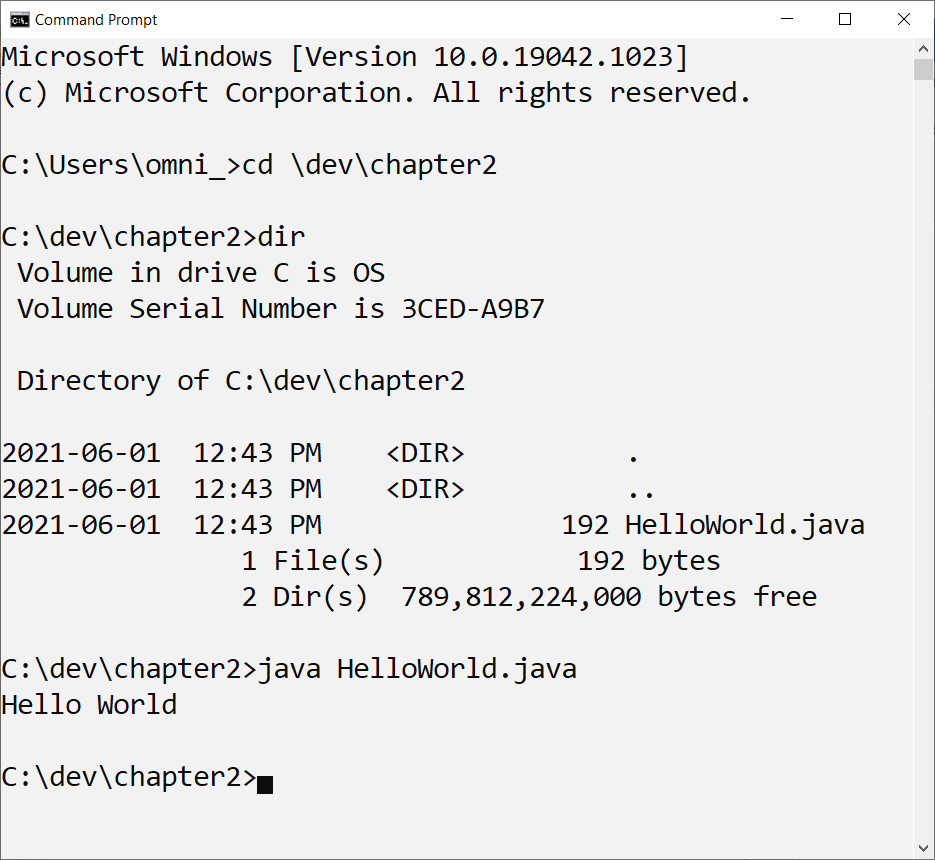
Open a command or console on your computer. Navigate to the folder that holds the program. Enter dir or ls to view the directory of the folder and verify that HelloWorld.java is there. Once in the folder you can run the program as shown in this screen capture. Here is how this is done in Windows.

The command to run your code is java HelloWorld.java. This will only work if your program consists of just a single file. What this will look like may be different on your computer. Regardless of whether you use a Win, Mac, or Linux computer the outcome, the printing in the console or terminal of Hello World, will be the same. If it does not work because you have a message telling you that java cannot be found then go back to chapter 1 and review the section on installing the Java SDK.

Let us examine what the different parts of this code are and how we can use them. This will be a brief summary and more details will be discussed in later chapters.

public class HelloWorld {

As already pointed out, every Java source code file must have a class structure. There can be more than one class structure in a file but only one of these structures must be described as public. The keyword public describes access control and is an important feature of object-oriented languages. For now, all we need to be aware of is that public access control means that there are no restrictions to using this code. Other access control types will come up in later chapters.

    public void perform() {
        System.out.println("Hello World");
    }

This is the method perform. Methods can optionally receive information and/or return a result. This method does not expect any information to be sent in as its parenthesis found after perform are left empty.

Methods can behave similarly to a mathematical function and return an answer or result. If we write 4 + 3 we say that it will return the answer 7. Programming languages allow you to construct methods that do or do not return a result. The keyword void in front of the method name tells us that this method does not return a result. It does perform an action, displaying the string Hello World on your console or terminal display.

The code System.out.println tells us that we require our program to display whatever is found in the parenthesis that follows println. If we did not place anything in the parenthesis then the cursor advances to the next line. As we are displaying a string, the cursor will advance to the next line after displaying the string. The preceding two words, System and out, identify from which Java library the method println comes from. The Java SDK that you installed comes with a wide range of libraries that you can take advantage of in any program that you write.

    public static void main(String... args) {
        new HelloWorld().perform();
    }

This second method in this class is main. Every desktop application that you write must have a main method. Java applications that run on web servers do not have a main. When we run a desktop Java program, the Java runtime will locate the main method and begin executing the program with whatever instructions it finds in this method.

There are three words in front of main. They are public that we already know is something called access control. The second word is static and this is a description of how this code is managed in the computer’s memory. The last word is void. This tells us that when the actions in the main method are carried out, there is no value or result that comes about from the actions.

Then there are the parenthesis containing String… args. This is called the method parameter. Using this type of syntax means that we can call upon this method with zero or more arguments as strings. The main method must have String… args or its alternate syntax String[] args. There can only be this one mandatory parameter, no fewer or no more. As it is the main method, all arguments come from the command line where the program is executed from.

In object-oriented Java we must command the language to set aside memory for classes that now become objects. That is the purpose of new. This is followed by the name of the class, HelloWorld, we want to create. It ends with the method, perform, that we want to run when the program is ready to execute.

As you learn Java you will see many examples online and in books that do more in the main method than any example in this book. While using the main method to try out code is common, it is wrong to do. The main method’s job should be to create the first object and then transfer control to it. Anything more will set you on the wrong path.

As already presented, to run this program enter java HelloWorld.java. In a Windows, Linux, or Mac console. This command to run this program is the same on every operating system.

C:\dev\chapter2>java HelloWorld.java
Hello World

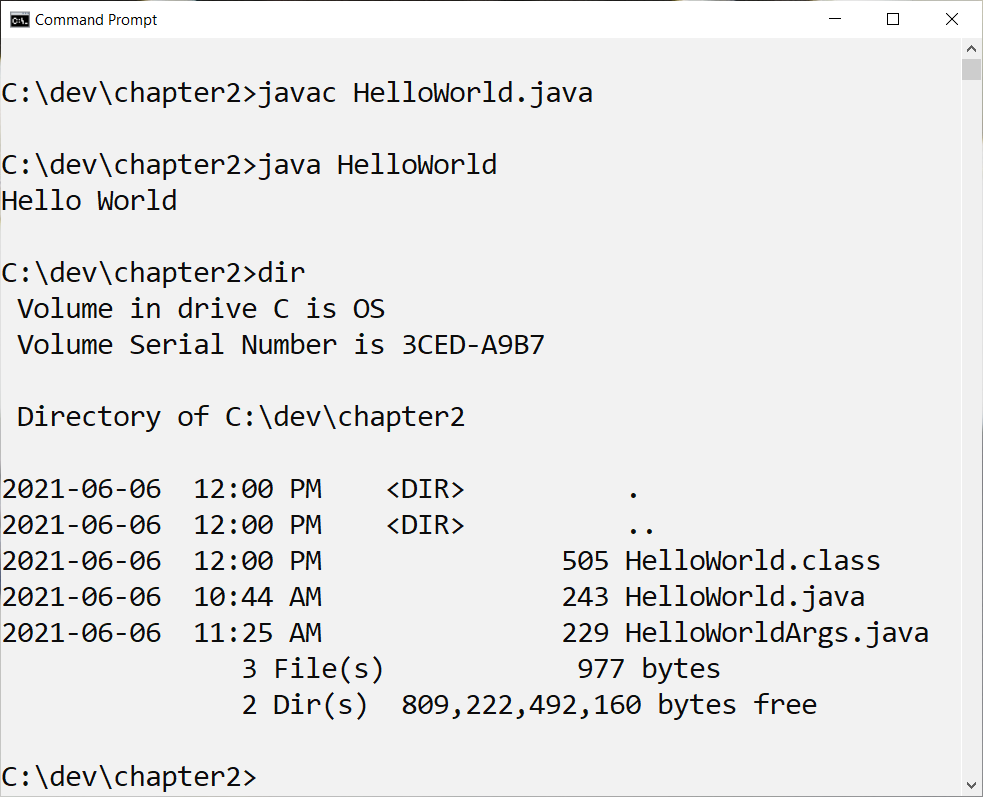
The first thing that happens when we enter this at the command line is that this source code file is loaded into memory and checked for syntax errors. Errors could be the result of typing errors, the most common reason. Errors can also be the result of using code in a way that is not permitted. Once the source code is found fault free, it is translated thru a process called compiling to create a bytecode class file. This bytecode file is executed when it is loaded into the Java Virtual Machine. While this is normally a two-step process, we are taking advantage of Single File Source Code to perform these two required actions in one step. Using the one step approach does not create a .class file on disk, only in memory so do not bother to look for it now. We will see it later in this book.

If we wanted to use the two-step process to compile and execute our code it would look like this.

In the two-step approach we first use the Java compiler tool javac. This will create a new file with the .class suffix. If this has executed successfully then we can run the program with the java command. You do not use the suffix .class when you run the class file. Try it as java HelloWorld.class and take note of what happens.

Parameters and Arguments

Let us see how parameters and arguments work by making some minor changes to the code. Remember, a parameter is a declaration that indicates that a method is expecting some information in the parenthesis of a method. An argument is the information that is sent, commonly called passed, to the method. It is not unusual to learn that some developers and even authors confuse argument with parameter. Many developers consider the words synonymous so should you get their meaning reversed then no one will correct you.

We will change the name of the class and so will also need to save this change into a new file with the new class name.

public class HelloWorldArgs {
    
	public void perform(String... args) {
		System.out.println("Hello World " + args[0]);
	}
    
        public static void main(String... args) {
		new HelloWorldArgs().perform(args);
	}
}

I will wait here while you make the changes.

As already pointed out, the main method should only be used to start a program. It should not participate for any other reason. As we want to display the arguments that will be passed to the parameter, we must modify perform so that it can receive the args first received by main.

The arguments that the perform method can use are in the form of a list of strings. This is what String… args mean. As a list we need to differentiate between the first, second, third, and more, positions. We do this by using subscripts, numbers inside square brackets. These numbers are ordinal and, as we have seen in chapter one, ordinal numbers in software development begin at zero.

In the println method the first new component is the plus (+) symbol. The plus symbol means concatenate[2] when used with Strings. With this knowledge we can recognize that what will be printed is the string Hello World followed by the first argument args[0].

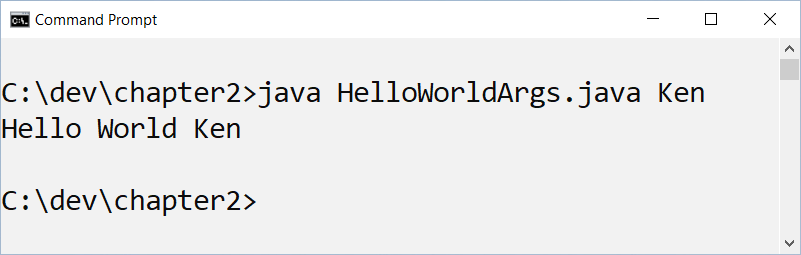
When we run, it will look like:

Notice that my first name has been entered after the name of the java source file. This word is delivered to the list of strings we named args. Try adding additional names such as:

java HelloWorldArgs.java Ken Bob

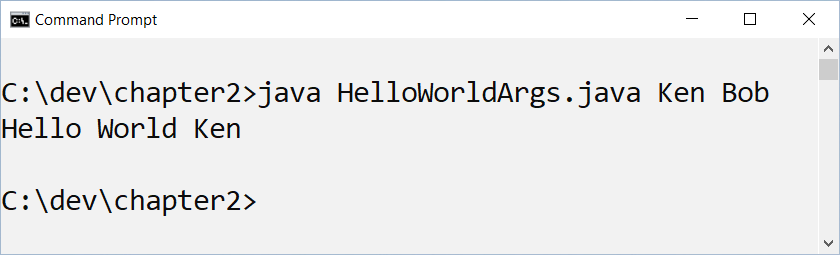
What do you suspect may happen? I always believe that before you ever run any code you must first predict what will be the outcome of running the code. When running it with two names this is what I get.

What happened to Bob? Bob is the second name in the list, but we only show the first one, Ken. You will explore this and solve it by going through the exercises in the next section.

Hands On

Now it is your turn. I want you to change the code. Before you change the code, write down your prediction and after it runs write down what happened. I want you to predict what will happen before you run it.

Make the following modifications. Sometimes it will work, sometimes nothing happens, and sometimes you get an error message, called a stack trace, from Java. Do not use an IDE, only a plain text editor. Record what happens and when you get errors, try to explain why the error occurred.

  1. Have Bob as well as Ken appear in the output
  2. Run your code that uses arguments from the command line but do not pass any arguments.
  3. Using the version of this code that expects a single argument, args[0], pass as a parameter  numbers and pass as a parameter punctuation symbols. What happens?
  4. What happens if you use this sentence as the argument?
  5. Change the name of the file HelloWorld.java to WorldHello.java and run the code. What happens?
  6. Retore the original file name to HelloWorld.java and this time change public class HelloWorld to public class WorldHello and run the code. What happens?
  7. Misspell println as printlm and run your code. What happens?

There are many a meme that implies that being a programmer means you spend most of your day searching online for answers. This is not entirely true. As a programmer you will be confronted with new problems to solve every day, quite possibly every hour. Whatever education you took to become a developer was likely near obsolete when you graduated. This all means that searching for answers is a part of every developer’s daily routine. Experience does not mean you will eventually search less. Experience means that you know how to ask the right question so that you get the answer you are looking for on the first page of search results.

  1. Here is your first online search problem. With the version of your program that only displayed one name with args[0] you saw how any other names, such as Ken, did not appear. It is possible to have more than one word displayed in the output when you execute the program with just args[0]. Find how this can be done. Write out why this syntax you found online works while my example with two names did not.

[1] start (a line of text) or position (a block of text, table, etc.) further from the margin than the main part of the text

[2] link (things) together in a chain or series. “some words may be concatenated, such that certain sounds are omitted”